
Storing a channel
1. "Radio"
2. "Satellite radio"
3. Select "All channels" or a desired category.
4. Select the desired channel.
5. Press the controller again.
6. Press the controller again to confirm the highlighted channel.
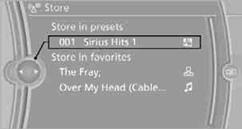
7. Select the desired memory location.
The channels are stored for the remote control currently in use.
You can also store the channels on the programmable memory keys.
See also:
Software Update
The vehicle supports various external devices
depending on the current software version. With
a software update, the vehicle can support new
cell phones or new external device, for example.
The ...
Vehicle equipment
All standard, country-specific and optional
equipment that is offered in the model series is
described in this chapter. Therefore, equipment
is also described that is not available in a vehicle, ...
Overview, instrument cluster
Overview, instrument cluster
1 Fuel gauge
2 Speedometer
3 Indicator/warning lamps
4 Tachometer
5 Engine oil temperature
6 Current fuel consumption
7 Electronic displays
8 Display/reset mil ...