
General information
The channels are offered in predefined packages. The packages must be enabled by telephone.
Navigation bar overview
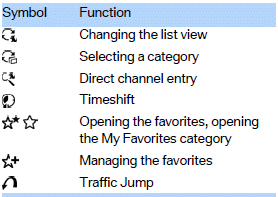
The functions of the navigation bar symbols can also be stored on the programmable memory buttons.
See also:
Display on the Control Display
Display the computer or trip computer on the
Control Display.
1. "Vehicle Info"
2. "Onboard info" or "Trip computer"
Resetting the fuel consumption and
speed
1. & ...
Switching off automatically
The system switches off and the LED goes out:
After approx. 160 ft/50 m when driving forward.
Above approx. 22 mph/36 km/h when driving
forward.
Switch on the system again if necessary. ...
Stored stations
General information
It is possible to store up to 40 stations.
Calling up a station
1. "Radio".
2. "Presets".
3. Select the desired station.
Storing a station
The station cu ...