
Storing stations
Via iDrive
1. "Radio"
2. "FM" or "AM"
3. Select the desired station.
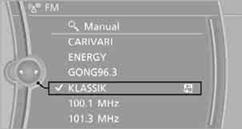
4. Press the controller for an extended period.
5. Select the desired memory location.
The stations are stored for the remote control currently in use.
Via programmable memory keysYou can store a station on the programmable memory keys.
1. Select a station.
2. Press and hold the desired button
 ...
...  .
.
See also:
Current fuel consumption
Current fuel consumption
Displays the current fuel consumption. You can
check whether you are currently driving in an efficient
and environmentally-friendly manner. ...
The concept
Top View assists you in parking and maneuvering.
The area around the doors and the road area
around the vehicle are shown on the Control
Display for this purpose. ...
BMW X5 xDrive35i: BMW's Turbocharged Inline-6 with Valvetronic.
BMW X5 xDrive 35i receives a brand new inline-6 gasoline engine, internally
dubbed "N55." The new engine features the same 3.0-liter displacement and 300
horsepower output of its predece ...