
Opening and closing: From inside
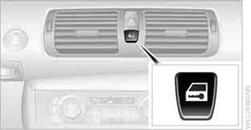
This button serves to unlock or lock doors and the trunk lid, but does not activate the anti-theft system. The fuel filler flap remains unlocked.
Automatic lockingYou can also set the situations in which the car locks:
1. "Settings"
2. "Door locks"
3. Select the desired function:
> "Lock if no door is opened"
The central locking system automatically locks the vehicle after a short time if no door has been opened.
> "Lock after start. to drive"
The central locking system locks the vehicle as soon as you begin to drive.
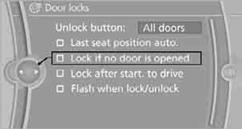
The setting is stored for the remote control currently in use.
Unlocking and opening doors> Either unlock the doors together using the button for the central locking system and then pull the door handle above the armrest or pull on the door handle of each door twice: the first time unlocks the door, the second time opens it.
Locking> Use the central locking button to lock all of the doors simultaneously, or press down the safety lock button of a door.
To prevent you from being locked out, the open driver's door cannot be locked using the lock button.
 Persons or animals in a parked vehicle could
lock the doors from the inside. You should therefore take the remote control with
you when you leave the vehicle so that the latter can be opened from outside.
Persons or animals in a parked vehicle could
lock the doors from the inside. You should therefore take the remote control with
you when you leave the vehicle so that the latter can be opened from outside.
See also:
Interrupting the system
Interrupting the system
Press the lever up or down and additionally depress
the brake if the vehicle is stationary. The
mark in the speedometer changes color and the
distance indicator goes o ...
Destination guidance with trafficbulletins
General information
Detour suggestions from the navigation system
can be manually accepted in the semi-dynamic
destination guidance. In the dynamic destination
guidance, they are automatically acc ...
Notes
Displaying notes1. "Office"
2. "Notes"
All notes are displayed.
Displaying a note1. Select the desired note.
2. To scroll through the note, if necessa ...