
Displaying messages
1. "Office"
2. "Messages"
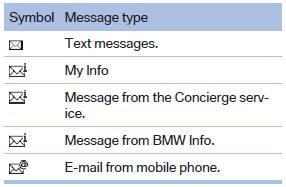
A symbol identifies the type of message.
See also:
Symbols
Indicates precautions that must be followed
precisely in order to avoid the possibility of personal
injury and serious damage to the vehicle.
◄ Marks the end of a specific item of informat ...
Tire inflation pressures X5 xDrive50i with three rows of seats
...
Status of the Owner's Manual
The manufacturer of your vehicle pursues a policy
of constant development that is conceived
to ensure that our vehicles continue to embody
the highest quality and safety standards. In rare
cas ...