
Controls
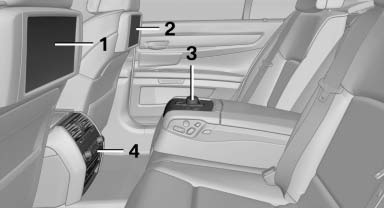
1 Screen, left
2 Screen, right
3 Controller with buttons
4 CD/DVD player
See also:
Vehicle equipment
All standard, country-specific and optional
equipment that is offered in the model series is
described in this chapter. Therefore, equipment
is also described that is not available in a vehicle,
e ...
Cargo
The trunk measures 14 cubic feet, which makes it similar in size to the Audi
A8's (14.6) but smaller than the Jaguar XJ's (16.4), LS 460's (18) and S-Class'
(16.3). It's quite deep and rectangular ...
Stored stations
General information
It is possible to store up to 40 stations.
Calling up a station
1. "Radio"
2. "Presets"
3. Select the desired station.
Storing a station
The station curr ...