
Replacing the batteries
 No rechargeable batteries
Do not use rechargeable batteries, as damage may result from the substances in the batteries.
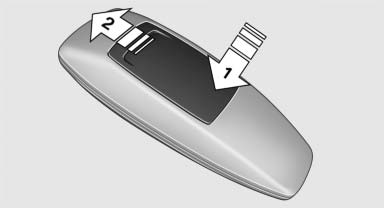
1. Remove the cover. Press on the cover, arrow 1, and push forward, arrow 2.
2. Insert batteries of the same type.
3. Close the cover.
 Take the used battery to a recycling center
or to your service center.
Take the used battery to a recycling center
or to your service center.
See also:
Starting destination guidance
1. "Navigation"
2. Make a destination entry.
3. "Accept destination"
4. "Start guidance"
The route is shown on the Control Display.
The distance to the destinati ...
Fuel gauge
Fuel tank capacity: approx. 14 US gal/53 liters. You can find information on
refueling on page 206.
If the tilt of the vehicle varies for a longer period, when you are driving in
mountainous ar ...
Distance to back of head: electrical
head restraints
The head restraint is automatically repositioned
when the shoulder support is adjusted. ...