
Rear CD/DVD player
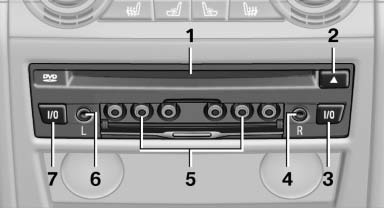
1 CD/DVD slot
2 Eject CD/DVD
3 On/off, right
4 Headphone connection, right
5 RCA sockets
6 Headphone connection, left
7 On/off, left
See also:
Status display
The current status of the Flat Tire Monitor can
be displayed on the Control Display, e.g.,
whether or not the FTM is active.
1. "Vehicle Info"
2. "Vehicle status"
3. " ...
What to do if...
Information on suitable mobile phones
The mobile phone could not be paired or connected.
▷ Is Bluetooth activated in the vehicle and on
the mobile phone? Activate Bluetooth on
the vehicle ...
Voice phone book
Depending on how your vehicle is equipped, it
may be necessary to create your own voice
phone book.
The entries must be entered using voice activation
and are separate from the memory in the
...