
Controls
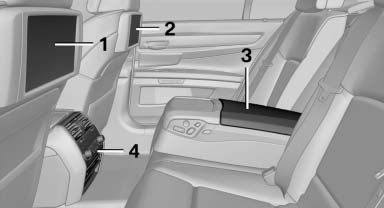
1 Screen, left
2 Screen, right
3 Center armrest, remote control
4 CD/DVD player
See also:
Safety
Neither the Insurance Institute for Highway Safety nor the National Highway
Traffic Safety Administration has tested the 2007 X3. Standard safety features
include four-wheel-disc antilock brakes, ...
BMW 650i in the Market
I may prefer the Jaguar to the BMW, but the 650i is still a remarkable
machine that will find plenty of fans among current BMW owners. Does it deliver
a luxurious convertible interior and a gorgeo ...
1 Series M in the Market
The 1 Series M has few direct competitors. With its 2+2 seating and $47,000
starting price, the Audi TTS is in the same ballpark, but its performance trails
the 1M's, and you can't get a manual tr ...