
Replacing the batteries
 No rechargeable batteries
Do not use rechargeable batteries, as damage may result from the substances in the batteries.
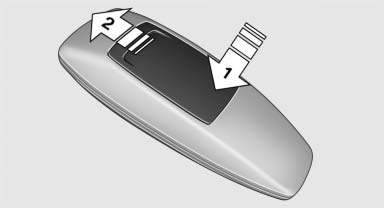
1. Remove the cover. Press on the cover, arrow 1, and push forward, arrow 2.
2. Insert batteries of the same type.
3. Close the cover.
 Take the used battery to a recycling center
or to your service center.
Take the used battery to a recycling center
or to your service center.
See also:
Programmable memory buttons
General information
The Owner's Manual can be stored on the programmable
memory buttons and called up directly.
Storing
1. "Owner's Manual" Select via the iDrive.
2. Press the desired ...
Start/Stop button
Pressing the Start/Stop button switches radio readiness or the ignition on or
off.
Manual transmission: if you press the Start/Stop
button and depress the clutch, the engine starts.
Automatic ...
Enabling DVD system
The DVD system can be enabled via iDrive.
1. "Settings"
2. "Allow rear control"
3. "Rear DVD system active"
Rear DVD system active ...