
Opening the favorites
If an activated favorite is played back, the following message appears for approx. 20 seconds: "Favorite alert!".
 "Favorites"
Select the symbol while the message is shown.
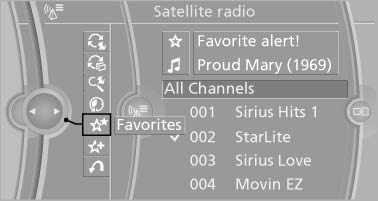
The displayed favorite is played.
If there is no message, the system changes to the My Favorites category. All favorites currently being broadcast can be selected from a list.
See also:
Selecting menu items
Menu items shown in white can be selected.
1. Turn the controller until the desired menu
item is highlighted.
2. Press the controller.
Menu items in the Owner's Manual
In the Owner's Manual, m ...
Resetting the system
Reset the system after each correction of the
tire inflation pressure and after every tire or
wheel change.
1. "Vehicle Info"
2. "Vehicle status"
3. "Reset"
4. S ...
Buttons on the remote control
1 Unlocking
2 Locking
3 Opening the trunk lid
4 Panic mode*, headlamp courtesy delay feature ...