
Equalizer
Setting for individual audio frequency ranges.
Adjusting the equalizer
1. "CD/Multimedia", "Radio" or "Settings"
2. "Tone"
3. "Equalizer"
4. Select the desired setting.
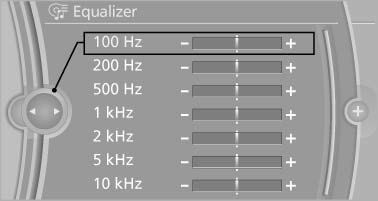
5. To adjust: turn the controller.
6. To store: press the controller.
See also:
Activating HDC
Press the button; the LED above
the button
lights up. ...
Controls
Controls
1. Control Display
2. Controller with buttons
The buttons can be used to open the menus
directly. The controller can be used to select
menu items and create the settings.
The button ...
Open trunk lid with no-touch activation
With Comfort Access, the trunk lid can be
opened with no-touch activation using the remote
control you are carrying.
A sensor detects a directed foot motion in the
center of the area at the rea ...