
Treble, bass, balance, and fader
▷ "Treble": treble adjustment. ▷ "Bass": depth adjustment. ▷ "Balance": left/right volume distribution. ▷ "Fader": front/rear volume distribution.
Setting treble, bass, balance, and fader
1. "CD/Multimedia", "Radio" or "Settings"
2. "Tone"
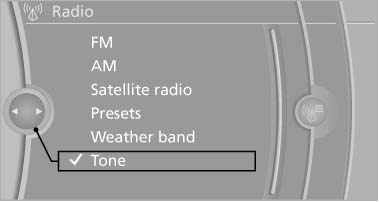
3. Select the desired tone settings.
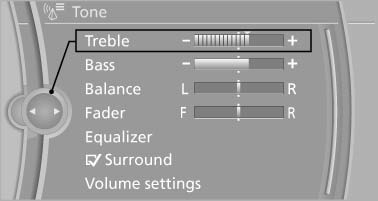
4. To adjust: turn the controller.
5. To store: press the controller.
See also:
Airbags
Airbags
1 Front airbag, driver
2 Front airbag, front passenger
3 Head airbag
4 Side airbag
5 Knee airbags ...
Switching the split screen on and off
1.
Press the button.
2. "Split screen" ...
Playing music
Music search
All tracks for which additional information has
been stored can be accessed by the music
search. Tracks without additional information
can be called up via the corresponding album. ...