
Integrated key
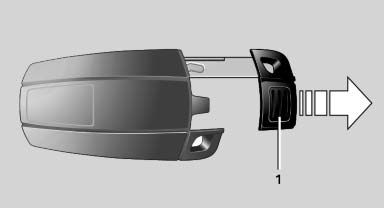
Integrated key
Press button 1 and pull out the key.
The integrated key fits the following locks:
▷ Driver's door, refer
▷ Cargo floor cover in cargo area
See also:
Adjusting the volume
Turn the volume button while giving an instruction
until the desired volume is set.
▷ The volume remains constant even if the
volume of other audio sources is changed.
▷ The volume i ...
Time
Setting the time zone
1. "Settings"
2. "Time/Date"
3. "Time zone"
4. Select the desired time zone.
The time zone is stored.
Setting the time
1. "Settings" ...
Supplementary text messages
Addition information, such as on the cause of a
fault or the required action, can be called up via
Check Control.
The supplementary text of urgent messages is
displayed on the Control Display a ...