
Front ventilation
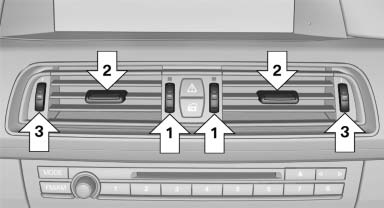
- Thumbwheels for adjusting the temperature,
arrows 1.
Toward blue: colder.
Toward red: warmer. - Lever for changing the air flow direction, arrow 2.
- Thumbwheels for opening and closing the vents continuously, arrows 3.
Ventilation levels
- Draft-free ventilation:
Thumbwheel, arrow 3, in level :
the air
current is fanned out.
:
the air
current is fanned out. - Maximum air volume:
Thumbwheel, arrow 3, in level
 :
the air is
partially fanned out and partially bundled.
This maximizes the air supply.
:
the air is
partially fanned out and partially bundled.
This maximizes the air supply. - Direct ventilation:
Thumbwheel, arrow 3, in level
 :
the air is
bundled and can be directed to a specific
point.
:
the air is
bundled and can be directed to a specific
point.
Adjusting the ventilation
- Ventilation for cooling: Adjust the vent to direct the air in your direction, e.g., if the vehicle interior is hot from the sun.
- Draft-free ventilation: Adjust the vent to let the air flow past you.
See also:
Around the center console: controls and displays
1. Coupe: microphone for voice activation systemand for telephonein
hands-free mode
Convertible: microphone on steering column
2. SOS: initiating an Emergency Request call
3. ...
Rear seat heating
Rear seat heating
Switching on
Press the button once for each
temperature
level.
The maximum temperature is reached when
three LEDs are lit.
If the drive is continued within approx. 15 mi ...
Arming and disarming the alarm
system
General information
When you lock or unlock the vehicle, either with
the remote control, Comfort Access or at the
door lock the alarm system is armed or disarmed
at the same time.
Door lock an ...