
Buttons on the remote control
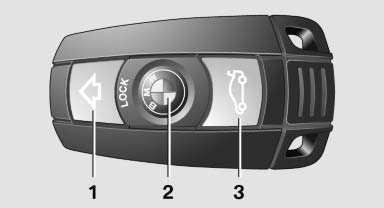
Buttons on the remote control
1. Unlocking
2. Locking
3. Opening tailgate
See also:
Automatic-Transmission
Starting the engine
1. Depress the brake pedal.
2. Press the Start/Stop button.
The ignition is activated automatically for a certain
time and is stopped as soon as the engine
starts. ...
Calendar
Displaying calendarAppointments from the last 20 days and the next 50 days can be displayed.
1. "Office"
2. "Calendar"
Appointments of the current day are displayed. ...
Wiper blade replacement
Do not fold down the wipers without wiper
blades
Do not fold down the wipers if wiper blades have
not been installed; this may damage the windshield.
Replacing the wiper blades
1. To change th ...