
Controls
Buttons at a glance
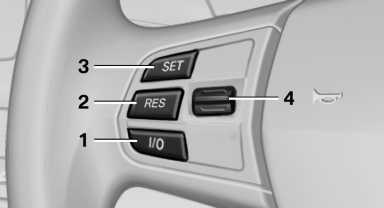
1 System on/off, interrupt
2 Resume speed
3 Store speed*
4 Store, maintain/change speed
Switching on
 Press the button on the steering
wheel.
The marking in the speedometer is set to the
current speed.
Press the button on the steering
wheel.
The marking in the speedometer is set to the
current speed.
Cruise control can be used.
Switching off
 Deactivated or interrupted system
If the system is deactivated or interrupted, actively intervene by braking and, if necessary, with evasive maneuvers; otherwise, there is the danger of an accident occurring.
 Press the button.
- If active: press twice.
- If interrupted: press once.
The displays go out. The stored desired speed is deleted.
Interrupting
 When active, press the button.
The system is automatically interrupted if:
- The brakes are applied.
- The clutch pedal is depressed.
- Transmission position D is disengaged.
- DTC Dynamic Traction Control is activated or DSC is deactivated.
- DSC is actively controlling stability.
- HDC is activated.
Maintaining/storing the current speed
 Press the button.
When the system is switched on, the current speed is maintained and stored as the desired speed.
It is displayed in the speedometer and briefly displayed in the instrument cluster, Displays in the speedometer.
When cruise control is maintained or stored, DSC Dynamic Stability Control is switched on, if necessary.
Change, maintain speed
The rocker switch can be pressed while interrupted to maintain and store the current speed.
Adapting the desired speed
Adapt the desired speed to the road conditions and be ready to brake at all times; otherwise, there is the danger of an accident occurring.
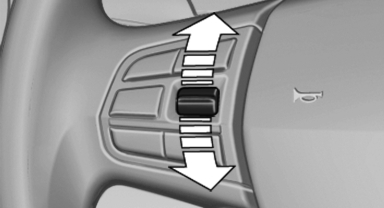
Press the rocker switch up or down repeatedly until the desired speed is set.
If active, the displayed speed is stored and the vehicle reaches the stored speed if the road is clear.
- Each time the rocker switch is pressed to the point of resistance, the desired speed increases or decreases by approx. 1 mph/ 1 km/h.
- Each time the rocker switch is pressed past the point of resistance, the desired speed increases or decreases by a maximum of 5 mph/10 km/h.
- Pressing the rocker switch to the resistance point and holding it accelerates or decelerates the vehicle without requiring pressure on the accelerator. After the rocker switch is released, the vehicle maintains its final speed. Pressing the switch beyond the resistance point causes the vehicle to accelerate more rapidly.
Resuming the desired speed
 Press the button.
The stored speed is reached and maintained.
See also:
1990: the third generation - premiere of the BMW 3-Series Coupé and BMW
3-Series Compact, new six-cylinder petrol and turbodiesel engines
1990 saw the introduction of the third-generation 3-Series, the four-door
Sedan taking to the stage on a wave of elegance and new technology. On top of
this, the dimensions of the body and the spa ...
The concept
Adaptive light control is a variable headlamp
control system that enables dynamic illumination
of the road surface.
Depending on the steering angle and other parameters,
the light from the head ...
Locking the doors andwindows
Rear doors
Push the locking lever on the rear doors down.
The door can now be opened from the outside
only.
Safety switch for the rear
Press the button on the driver's
door if
children ar ...