
Buttons at a glance
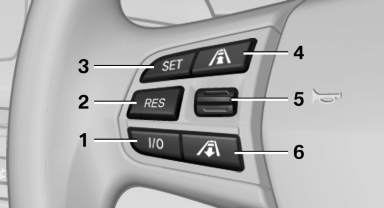
1 System on/off, interrupt
2 Resume speed
3 Store speed*
4 Reduce distance
5 Store, maintain/change speed
6 Increase distance
See also:
Headlamp courtesy delay feature
The low beams stay lit for a short while after the
ignition is switched off, if the lamps are switched
off and the headlamp flasher is switched on.
Setting the duration
1. "Settings"
...
Switching on/off manually
Press the button.
On: the LED lights up.
Off: the LED goes out.
The PDC is shown on the Control Display.
Switch on the backup camera via the iDrive. ...
Instrument lighting
Adjusting
The parking lamps or low beams
must be switched on to adjust the
brightness.
Adjust the brightness using the
thumbwheel. ...