
SPORT
Consistently sporty tuning of the suspension for greater driving agility with maximum driving stabilization.
The program can be configured to individual specifications.
The configuration is stored for the remote control currently in use.
Activating SPORT
 Press the button repeatedly until
SPORT appears in the tachometer.
Press the button repeatedly until
SPORT appears in the tachometer.
Configuring SPORT
When the display is activated on the Control Display, the sport program can be set to individual specifications.
After the sport program is activated, select "Configure SPORT mode" on the displayed panel and configure the program.
Optionally, the sport program can be configured before it is activated:
1. "Settings"
2. "SPORT mode"
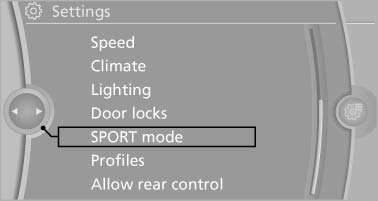
3. Configure the program.
This configuration is retrieved when the sport program is activated.
See also:
The concept
In addition to the PDC Park Distance Control, the
backup camera, can be
switched on.
PDC supports you when parking. Objects that
you are approaching slowly in front of or behind
your vehicle ...
Apps
At a glance
Certain software applications of a suitable cell
phone can be integrated in the vehicle. These
software applications are displayed on the Control
Display.
They are operated via iDr ...
Navigation
General information
Map
Split screen settings
Destination guidance with intermediate destinations
...