
Operating the programs
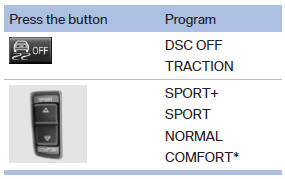
For Dynamic Damper Control*, the lower button is labeled with COMFORT.
Automatic program change
The system automatically switches to NORMAL in the following situations:
- Failure of Integral Active Steering*.
- Failure of Dynamic Damping Control*.
- The vehicle has a flat tire.
See also:
Supplementary text messages
Additional information on the Control Display,
e.g., on the cause of a malfunction or the required
action, can be called up via Check Control.
The text of urgent messages is displayed automatica ...
Storing music
General information
Music tracks from CDs/DVDs and USB devices
can be stored in the music collection on a hard
disc in the vehicle and played from there.
► Audio CD: tracks are converted i ...
Joint development and production together with the BMW-7-Series.
The world debut of the new BMW 5-Series Sedan opens up the latest chapter in
a truly impressive story of success. In the course of five model generations,
overall sales of the BMW 5-Series already ...