
Increasing or decreasing vehicle speed
You can specify your desired speed in the range from approx. 4 mph/6 km/h to approx. 15 mph/ 25 km/h using the rocker switch of the cruise control on the steering wheel. You can change the vehicle speed by pressing on the accelerator lightly.
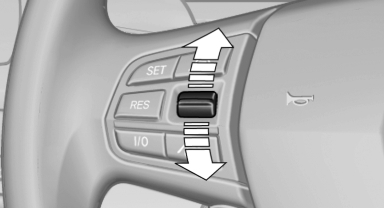
- Press up the rocker switch to the point of resistance: the speed increases gradually.
- Press up the rocker switch past the point of resistance: the speed increases while the rocker switch is pressed.
- Press down the rocker switch to the point of resistance: the speed decreases gradually.
- Press down the rocker switch past the point of resistance: when driving forward, the speed decreases to approx. 6 mph/10 km/h; when reversing, the speed decreases to approx. 4 mph/6 km/h.
See also:
Speed limit
Display of a speed limit which, when reached,
should cause a warning to be issued.
Renewed warning if the vehicle speed drops below
the set speed limit once by at least 3 mph/
5 km/h.
Displayi ...
Decreasing speed
Repeatedly pull the lever to the resistance point
or beyond, arrow 2, until the desired speed is
displayed.
▷ Each time the lever is pulled to the resistance
point, the desired speed is d ...
Head airbags
In a lateral impact, the head airbag supports the
head. ...