
Display
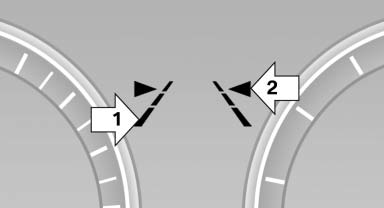
▷ Lines, arrow 1: the system is activated. ▷ Arrows, arrow 2: at least one lane marking was detected and warnings can be issued.
See also:
Interior rearview mirror
Reducing the blinding effect
Reducing the blinding effect
From behind when driving at night: turn the
knob. ...
Front
...
Determining the load limit
Determining the load limit
1. Locate the following statement on your vehicle’s
placard:
▷ The combined weight of occupants and
cargo should never exceed XXX kg or
YYY lbs. Otherwise, d ...