
Activating the High-beam Assistant
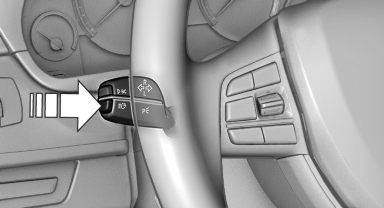
1. Turn the light switch to  or
or
 .
.
2. Press the button on the turn signal lever, arrow.
 The indicator lamp in the
instrument
cluster lights up.
The indicator lamp in the
instrument
cluster lights up.
When the lights are switched on, the high beams are switched on and off automatically.
The system responds to light from oncoming traffic and traffic driving ahead of you, and to adequate illumination, e.g., in towns and cities.
See also:
Opening
▷ Press the switch to the
resistance
point.
The window opens while the switch is held.
▷ Press the switch beyond the
resistance
point.
The window opens automatically.
Pressin ...
Removing: manual head restraints
Only remove the head restraint if no one will be
sitting in the seat in question.
1. Pull the head restraint upward as far as possible.
2. Press the button, arrow 1, and pull the head
restrain ...
Switching on/off
Press the button ...