
Detailed information on service requirements
More information on the scope of service required can be displayed on the Control Display.
1. "Vehicle Info"
2. "Vehicle status"
3.  "Service required"
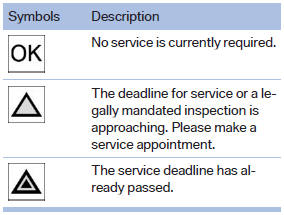
Required maintenance procedures and legally mandated inspections are displayed.
4. Select an entry to call up detailed information.
Symbols
See also:
Rear view camera and Surround View deliver a perfect overview
A rear view camera is also available for the new BMW 3-Series Sedan as an
extension of the Park Distance Control (PDC) system. PDC uses sensors in the
bumpers to detect the distance to obstacles i ...
Vehicle equipment
All standard, country-specific and optional
equipment that is offered in the model series is
described in this chapter. Therefore, equipment
is also described that is not available in a vehicle, ...
The concept
The central locking system becomes active
when the driver's door is closed.
The system simultaneously engages and releases
the locks on the following:
▷ Doors.
▷ Tailgate.
▷ ...