
Units of measure
Setting the units of measure
To set the units for fuel consumption, route/distance and temperature:
1. "Settings"
2. "Language/Units"
3. Select the desired menu item.
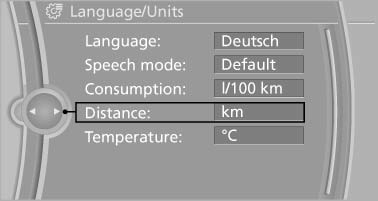
4. Select the desired unit.
The setting is stored for the remote control currently in use.
See also:
Operating from the inside
Via the button for the central locking system
If the vehicle is locked from the inside, the fuel
filler flap remains unlocked.
If an accident of a certain severity occurs, the
central locking sy ...
BMW X5: heating and ventilation, 3rd
row seats
The air in the area of the 3rd row seats can be
heated or recirculated. Air vents are located in
the storage compartment area between the
seats and in the footwell of the 3rd row seats.
BMW X ...
In cargo area
Open the right-hand side panel in the cargo
area. ...