
Adjusting the info display
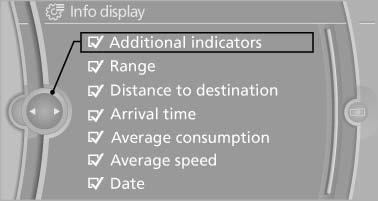
You can select what information from the computer is to be displayed on the info display of the instrument cluster.
1. "Settings"
2. "Info display"
3. Select the desired displays.
See also:
Releasing
With the ignition switched on:
Manual transmission: Press the
switch
while the brake or clutch is pressed.
Automatic transmission: Press the switch while
the brake is pressed or transmission ...
Selecting menu items
Menu items shown in white can be selected
1. Turn the controller until the desired menu
item is highlighted
Turn the controller until the desired menu
item is highlighted
2. Press the control ...
Resetting the tone settings
1. "CD/Multimedia", "Radio" or "Settings"
2. "Tone"
3. "Reset" ...