
Rear doors
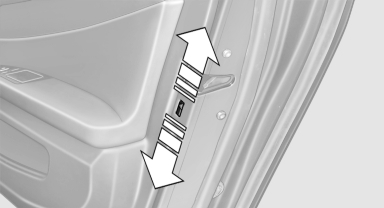
Push the locking lever on the rear doors down.
The door can now be opened from the outside only.
See also:
Navigation system
General information
The navigation system can determine the precise
position of the vehicle, with the aid of satellites
and vehicle sensors, and can reliably
guide you to every entered destinat ...
Switching the high beams on and offmanually
► High beams on, arrow 1.
► High beams off/headlamp flasher, arrow 2.
The High-beam Assistant can be switched off
when manually adjusting the light. To reactivate
the High-beam Assis ...
Weights
The values preceding the slash apply to vehicles
with manual transmission; the values following
the slash apply to vehicles with automatic transmission.
...