
Adjusting the height: manual head restraints
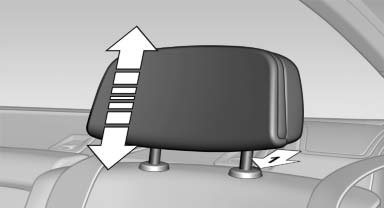
The height of the outer head restraints can be adjusted.
- To raise: pull.
- To lower: press the button, arrow 1, and push the head restraint down.
See also:
Control Display
Notes
▷ To clean the Control Display, follow the care
instructions
▷ Do not place objects close to the Control
Display; otherwise, the Control Display can
be damaged.
Switching of ...
Switching the microphone to mute
When a call is active, the microphone can be
muted.
1. "Telephone"
2. "Active calls"
3. "Microphone mute"
A microphone that has been switched to mute
is automatic ...
Time
Setting the time zone
1. "Settings"
2. "Time/Date"
3. "Time zone"
4. Select the desired time zone.
The time zone is stored.
Setting the time
1. "Settings" ...