
Lumbar support
The curvature of the seat backrest can be adjusted in such a way that it supports the lumbar region of the spine. The lower back and the spine are supported for upright posture.
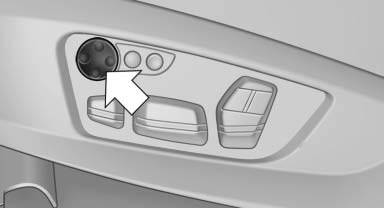
- Press the front/rear section of the switch. The curvature is increased/decreased.
- Press the upper/lower section of the switch. The curvature is shifted up/down.
See also:
Managing music
Albums
Renaming an album
The name of the album, if available, is automatically
entered when the album is stored. If the
name is not available, it can be changed later if
desired.
1. "CD/ ...
Profile management
Opening the profiles
A different profile can be called up than the one
associated with the remote control currently in
use.
1. "Settings"
2. "Profiles"
3. Select a profil ...
General information
Instructions for voice activation system.
To have the available spoken instructions read
out loud: ›Voice commands‹
The following short commands apply to vehicles
equipped with a voice activatio ...