
Components of the integrated Owner's Manual
The integrated Owner's Manual consists of three parts, which offer various levels of information or access possibilities.
Quick Reference Guide
Located in the Quick Reference is important information for the operation of the vehicle, the operation of basic vehicle functions or for what to do in the event of a flat tire. This information can also be displayed during driving.
Search by pictures
Information and descriptions based on illustrations can be searched via search by pictures. This is helpful, for example, if the description of an outfitting package that cannot be named is needed.
Owner's Manual
Information and descriptions can be searched by direct entry of a search term via the index.
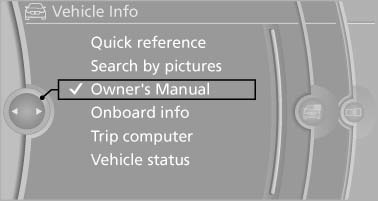
Select components
1. Press the button.
2. Turn the controller: open "Vehicle Info".
3. Press the controller.
4. Selecting desired range:
- "Quick reference"
- "Search by pictures"
- "Owner's Manual"
See also:
Integrated key
Press the button on the back of the remote control,
arrow 1, and pull out the key, arrow 2.
The integrated key fits the following locks:
Driver's door.
Trunk lid.
Storage compartment in t ...
Switching on wipers
Press the wiper lever upward, arrow 1.
The lever automatically returns to its initial position
when released.
Normal wiper speed
Press up once.
The system switches to operation in the intermitte ...
The concept
The central locking system becomes active
when the driver's door is closed.
The system simultaneously engages and releases
the locks on the following:
▷ Doors.
▷ Trunk lid.
▷ ...