
All around the headliner
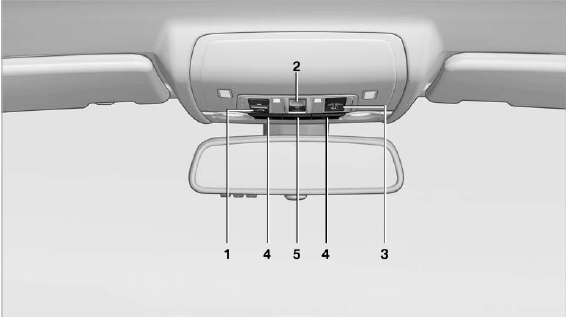
All around the headliner
1.  Emergency Request
2.  Glass sunroof
3.  Indicator lamp for the front
passenger airbags
Indicator lamp for the front
passenger airbags
4.  Reading lamps
5.  Interior lamps
See also:
1982: the second generation - four-door, Convertible, Touring and BMW M3,
plus the first diesel engine for the sports sedan
The new BMW 3-Series oozed progress and variety out of every pore, as its
fresh new design, optimised aerodynamics, improved space and comfort, higher
output and additional body and engine variant ...
Status field symbols
The symbols are grouped into various categories.
Radio symbols
Symbol
Meaning
Traffic bulletins switched on.
HD Radio is switched on.
Satellite radio ...
Display
Instrument cluster
Display in the instrument cluster.
Instrument cluster with enhanced
features
Display in the instrument cluster
with expanded scope.
Detailed information on service
req ...