
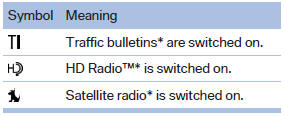
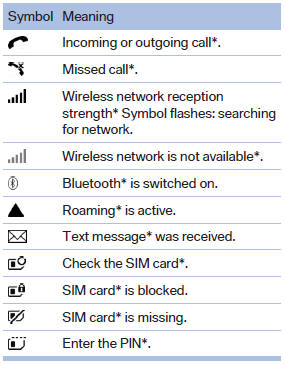
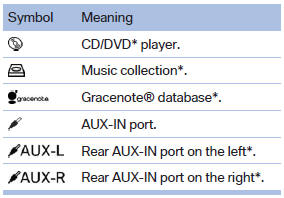
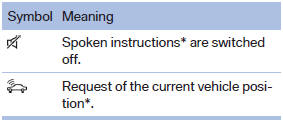
Status field symbols
The symbols are grouped as follows.
Radio symbols
Telephone symbols
Entertainment symbols
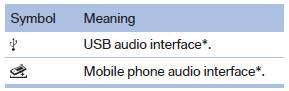
Additional symbols
See also:
Coupe: glass roof, electric
To prevent injuries, watch the glass roof while
closing it.
Take the remote control with you when you leave the car; otherwise, children
could operate the roof and possibly injure themselves.
...
Stowing cargo
BMW X5
BMW X5
BMW X6
BMW X6
▷ Very heavy cargo: when the rear seat is not
occupied, secure each of the outer safety
belts in the BMW X5 in the opposite buckle.
▷ Heavy cargo: ...
Fuel gauge
The vehicle inclination may
cause the display to vary.
Notes on refueling. ...