
Controls
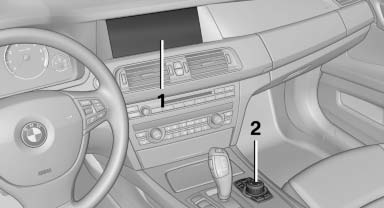
1 Control Display
2 Controller with buttons
The buttons can be used to open the menus directly. The controller can be used to select menu items and create the settings.
See also:
Displaying the button assignment
Use a finger to touch the buttons. Do not wear
gloves or use objects.
The key assignment is displayed at the top edge
of the screen.
▷ To display short information: touch the button.
...
Mobile communication devices in the
vehicle
Mobile communication devices in the vehicle
It is not recommended to use mobile phones,
such as mobile phones without a direct connection
to an external aerial in the vehicle's passenger
comp ...
Camera
Camera
The camera is located near the base of the mirror.
Keep windshield clean and clear in the area in
front of the interior rear view mirror. ...