
Instrument cluster, electronic displays
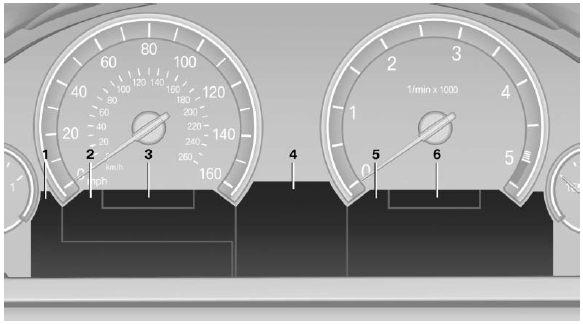
1 Symbols and messages, e.g., warnings
2 Range
3 Computer
4 Navigation display
Service display
5 Selection list, e.g., radio
6 Transmission displays
See also:
Vehicle equipment
All standard, country-specific and optional
equipment that is offered in the model series is
described in this chapter. Therefore, equipment
is also described that is not available in a vehicle, ...
Actions in the event of a flat tire
Run-flat tires
You can continue driving with a damaged tire at
speeds up to 50 mph/80 km/h.
Do not continue driving without run-flat
tires
If the vehicle is not equipped with run-flat tires
...
New contact
1. "Contacts"
2. "New contact"
3. If input boxes are already filled with previous entries: "Delete input
fields"
4. To fill in the entry fi ...