
Instrument cluster
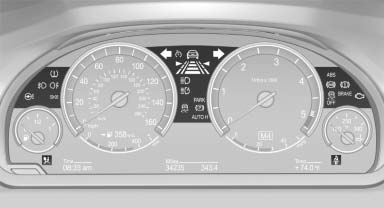
The indicator and warning lamps can light up in a variety of combinations and colors.
Several of the lamps are checked for proper functioning when the engine is started or the ignition is switched on, and light up briefly in the process.
See also:
Notes
BMW CD/DVD players and changers are officially
designated Class 1 laser products. Do not operate if the cover is damaged; otherwise,
severe eye damage can result.
Do not use self-recorded CDs/DV ...
Service and Warranty Information Booklet for US models and
Warranty and Service Guide Booklet for Canadian models
Please consult your Service and Warranty Information
Booklet for US models and Warranty and
Service Guide Booklet for Canadian models for
additional information on service requirements.
Mainten ...
USB audio interface/mobile phone
audio interface
At a glance
It is possible to connect external audio devices.
They can be operated via iDrive. The sound is
output on the vehicle loudspeakers
Connectors for external devices
▷ Connection ...