
Instrument cluster
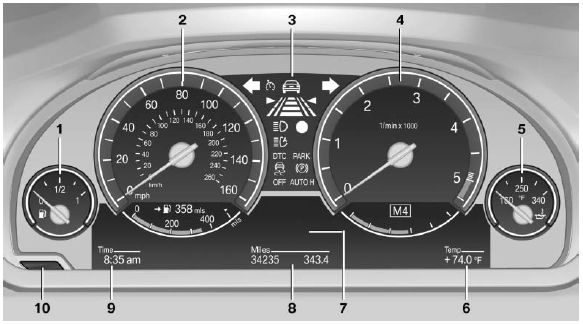
1 Fuel gauge
2 Speedometer
3 Indicator/warning lamps
4 Tachometer
5 Engine oil temperature
6 External temperature
7 Electronic displays
8 Miles, trip miles
9 Clock
10 Reset miles
See also:
Telephone
...
Configuring the warning time
After the warning function is switched on, the
warning time can be set via the iDrive. For a late
warning time, prewarning is deactivated.
These settings have no effect on the time of the
warni ...
New for 2011
A new eight-speed automatic transmission is standard on the 2011 models and
replaces a six-speed automatic. The xDrive35i has BMW's new single-turbo
3.0-liter inline six-cylinder (replacing a twin ...