
BMW Assist or ConnectedDrive
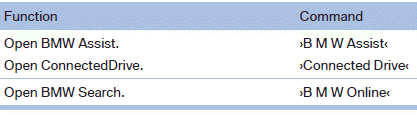
See also:
System limits
The maximum recording range of the camera is
330 ft/100 m.
Display
The images from both cameras are shown simultaneously
on the Control Display.
Check the traffic situation as well
Check the ...
Switching off automatically
The system switches off and the LED goes out:
▷ After approx. 165 ft/50 m when driving forward.
▷ After approx. 22 mph/35 km/h when driving
forward.
Switch on the system again if nece ...
Displays in the instrument cluster
Indicator lamp
Depending on how the vehicle is
equipped,
the indicator lamp in the instrument
cluster indicates whether the system is
switched on.
Desired speed
► The marking lights up ...