
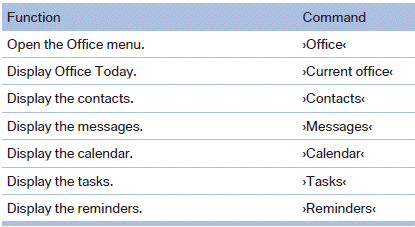
Office
See also:
Safety belt reminder for the driver's and front passenger seat
The indicator lamp lights up and
a signal
sounds. In addition, a message appears
on the Control Display. Check
whether the safety belt has been fastened correctly.
The safety belt reminder i ...
Configuring the warning time
After the warning function is switched on, the
warning time can be set via the iDrive. For a late
warning time, prewarning is deactivated.
These settings have no effect on the time of the
warni ...
Received calls
Displaying calls
The list of incoming calls on the mobile phone is
transmitted to the vehicle, depending on the
mobile phone. The 20 telephone calls that were
last received are displayed. The s ...