
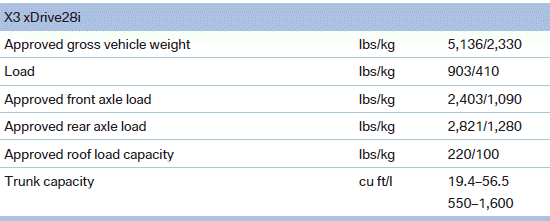
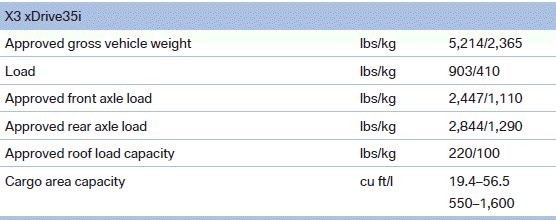
Weights
See also:
Changing between panels
After a menu item is selected, e.g., "Radio", a
new panel is displayed. Panels can overlap.
▷ Move the controller to the left.
The current panel is closed and the previous
panel ...
Displays in the instrument cluster
The transmission
position is displayed,
e.g.: P. ...
Sitting safely
The ideal seating position can make a vital contribution
to relaxed, fatigue-free driving.
The seating position plays an important role in
an accident in combination with:
▷ Safety belts.
...