
Entering a phone number
Dialing a number
1. "Telephone"
2. "Dial number"
3. Select the digits individually.
4.  Select the symbol.
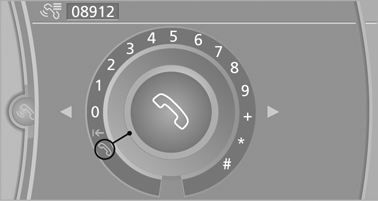
The phone number can also be entered by voice.
See also:
Concierge service
General information
The BMW Assist Concierge service offers information
on events, gas stations or hotels, and
provides phone numbers and addresses. Hotels can be booked directly by the BMW
Assis ...
2009 BMW X3 Review
There is very little about the 2009 BMW X3 that hasn't already been covered
by Cars.com; the 2007 model that Kelsey Mays reviewed is essentially the same
vehicle that's offered for 2009. What has ...
Head-up Display
The concept
This system projects important information into
the driver's field of vision, e.g., the speed.
In this way, the driver can get information without
averting his or her eyes from the ...