
Incoming call
Receiving calls
If the number of the caller is stored in the phone book and is transmitted by the network, the name of the contact is displayed. Otherwise, only the phone number is displayed.
If more than one phone number is assigned to a contact, only the name of the contact is displayed.
For calls on the additional telephone, the number is only displayed if it is transmitted by the network.
An incoming call to the additional telephone is automatically rejected if there is an active call on the other telephone.
Accepting a call
Via iDrive
 "Accept"
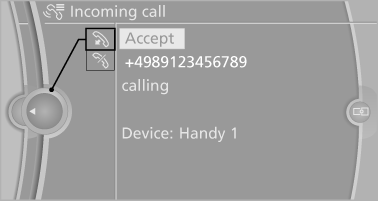
Via the button on the steering wheel
 Press the button.
Via the instrument cluster
"Accept"
Rejecting a call
Via iDrive
 "Reject"
Via the instrument cluster
"Reject"
Ending a call
Via iDrive
 "End call"
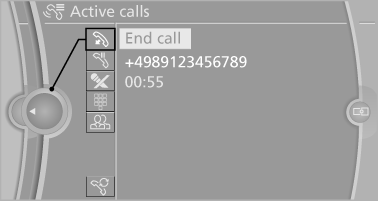
Via the button on the steering wheel
 Press the button.
Via the instrument cluster
"End call"
See also:
DTMF suffix dialing
DTMF suffix dialing can be used for gaining access
to network services or for controlling devices,
e.g., to make a remote inquiry of an answering
machine. The DTMF code is needed for this
purp ...
Reassigning individual programs
1. Switch on the ignition.
2. Hold the hand-held transmitter at a distance
of approx. 1 to 3 in/2.5 to 8 cm from the
memory buttons.
The required distance depends on the particular
hand-held t ...
Easy to operate iDrive
Then there's the iDrive.
After testing a series of BMW's this year, I am starting to take a more
German approach to the iDrive. Americans are just stupid.
Please don't be offended by that if you ...