
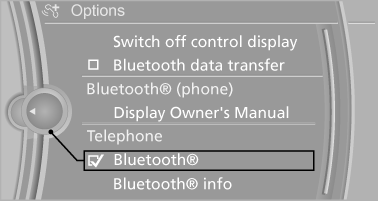
Activating/deactivating Bluetooth
Bluetooth is not permitted everywhere. Comply with all safety guidelines and regulations.
1. "Telephone"
2. Open "Options".
3. "Bluetooth®"
See also:
Vehicle equipm
All standard, country-specific and optional
equipment that is offered in the model series is
described in this chapter. Therefore, equipment
is also described that is not available in a vehicle,
e ...
Switching on automatically
Select transmission position R with the engine
running. ...
Controls at a glance
Controls
1. Control Display
2. Controller with buttons
You can use the buttons to open the menus directly. The controller can be used to
select the menu items and create settings.
...