
Controls
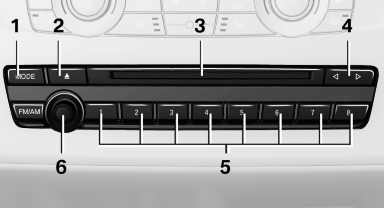
1 Change the entertainment source
2 Eject CD/DVD
3 CD/DVD drive
4 Change station/track
5 Programmable memory buttons
6 Volume, on/off
See also:
Display on the Control Display
The traffic area to the left and right is displayed
on the Control Display.
Guidelines at the bottom of the image show the
position of the front of the vehicle.
Brightness
With the Side View ...
Snow chains
Only certain fine-link snow chains have been
tested by BMW, classified as safe for use and
recommended. Consult your service center for
more information.
BMW X5: use only in pairs on the rear w ...
Issued warning
If you leave the lane and if a lane marking has
been detected, the steering wheel begins vibrating.
If the turn signal is set before changing the lane,
a warning is not issued.
End of warning
T ...