
Equalizer
Setting for individual audio frequency ranges.
Adjusting the equalizer
1. "CD/Multimedia", "Radio" or "Settings"
2. "Tone"
3. "Equalizer"
4. Select the desired setting.
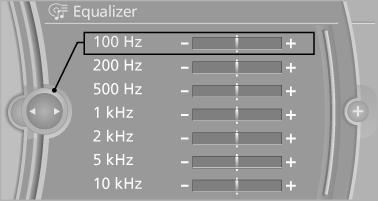
5. To adjust: turn the controller.
6. To store: press the controller.
See also:
Specifying the home address
A home address can be stored. It appears at the
top of the contact list.
1. "Home"
2. Create a contact.
3. "Store contact in vehicle" ...
Headlamp glass
Condensation can form on the inside of the external
lamps in cool or humid weather. When the
light is switched on, the condensation evaporates
after a short time. The headlamp glasses
do not n ...
Automatic deactivation of the front passenger airbags
The occupation of the seat is detected by evaluating
the impression on the occupied seat surface
of the front passenger seat.
The front and side airbags on the front passenger
side are activate ...