
Manual destination entry
General information
The system supports you in entering street names and house numbers by automatically completing the entry and providing entry comparisons, refer to page 21.
Stored town/city and street names can be called up quickly.
► If the existing entries should not be changed,
the entries for the state/province and town/
city can be skipped.
► Destination guidance is started to the town/
city center if no street is entered.
Entering a state/province
1. "Navigation"
2. "Enter address"

3. Select "State/Province" or the displayed state/province.
Entering a town/city
1. Select "Town/City/Postal Code" or the displayed town/city.
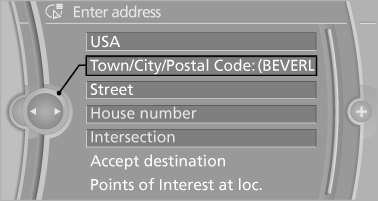
2. Select letters, if applicable.
The list is narrowed down further with each entry.
3. Move the controller to the right.
4. Select the town/city name from the list.
If there are several towns/cities with the same name:
1. Change to the list of town/city names.
2. Highlight the town/city.
3. Select the town/city.
Entering the postal code
1. Select "Town/City/Postal Code" or the displayed
town/city.
2.  Select the symbol.
3. Select the numbers.
4. Change to the list of postal codes and towns/
cities.
5. Highlight the entry.
6. Selecting an entry.
Entering a street and intersection
1. Select "Street" or the displayed street.
2. Enter a street and intersection in the same
way as you would enter a town/city.
If there are several streets with the same name:
1. Change to the list of street names.
2. Highlight the street.
3. Select the street.
Alternative: enter the street address and house number
1. Select "Street" or the displayed street.
2. Enter the street as you would the town/city.
3. "House number"
4. Select the numbers.
5. Change to the list of house numbers.
6. Select a house number or range of house
numbers.
Street does not exist in the destination city/town
The desired street does not exist in the specified city/town because it belongs to another part of the city/town.
1. "Navigation"
2. "Enter address"
3. Select "Street" or the displayed street.
4. Change to the list of street names.
5. Select "In" the displayed country.
All streets of the selected state/province are offered. The associated town/city is displayed after the street name.

6. Select the letters.
7. Change to the list of street names.
8. Highlight the street.
9. Select the street.
Starting destination guidance after entering the destination
1. "Accept destination"
2. "Start guidance" or "Add as another
destination"
Add, a destination as a further destination.
See also:
Pinch protection system
If the closing force when closing the glass sunroof
exceeds a certain value, the closing movement
is stopped, beginning at approximately the
middle of the opening in the roof, or from the
tilt ...
Fold-out position of the wipers
Fold-out position of the wipers
Required when changing the wiper blades or
under frosty conditions, for example.
1. Switch off the ignition.
2. Under frosty conditions, ensure that the
wiper bl ...
5 Series Gran Turismo
For 2010, BMW added a hatchback version of its rear-wheel-drive 5 Series,
dubbed the 5 Series Gran Turismo, starting with a 550i "GT" powered by the same
400-hp, twin-turbo V-8 as the 55 ...