
Increasing or decreasing vehicle speed
Specify desired speed in the range from approx.
4 mph/6 km/h to approx. 15 mph/25 km/h using the rocker switch of the cruise control on the steering wheel. Vehicle speed can be changed by lightly accelerating.
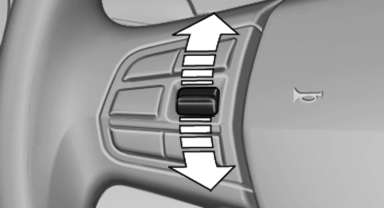
► Press up the rocker switch to the point of
resistance: the speed increases gradually.
► Press up the rocker switch past the point of
resistance: the speed increases while the
rocker switch is pressed.
► Press down the rocker switch to the point of
resistance: the speed decreases gradually.
► Press down the rocker switch past the point
of resistance: when driving forward, the
speed decreases to approx. 6 mph/10 km/h;
when reversing, the speed decreases to approx.
4 mph/6 km/h.
See also:
Instrument lighting
Adjusting
The parking lamps or low beams
must be switched on to adjust the
brightness.
Adjust the brightness using the
thumbwheel. ...
xDrive
xDrive is the all-wheel-drive system of your vehicle.
Concerted action by the xDrive and DSC
further optimize traction and driving dynamics.
The xDrive all-wheel-drive system variably distribut ...
E-mail
Displaying e-mails
1. "Office".
2. "Messages".
3. Select the desired e-mail.
Displaying e-mail contacts
If the sender and recipient of an e-mail are transmitted
by the mobil ...