
Brake force display
The concept
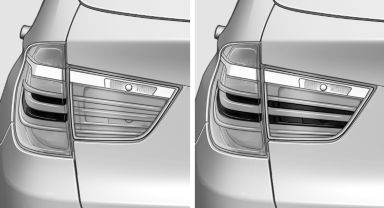
► During normal brake application, the outer
brake lamps light up.
► During heavy brake application, the inner
brake lamps light up in addition.
See also:
Integral Active Steering
The concept
Integral Active Steering is a combination of Active
Steering and rear axle steering.
Active Steering varies the steering angle of the
wheels in relation to the steering wheel movemen ...
BMW X3 iDrive Owners Manual
h1 {color: red;}
h2 {color: green;}
h3 {color: blue;}
h4 {color: #FF00FF;}
...
Rear door controls
Roller blind for the side windows
Press the button.
The roller blind can only be extended or retracted
when the side window is closed.
Roller blind for rear window
Press the button.
Raising ...