
Units of measure
Setting the units of measure
To set the units for fuel consumption, route/distance and temperature:
1. "Settings"
2. "Language/Units"
3. Select the desired menu item.
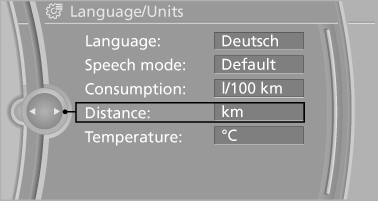
4. Select the desired unit.
The setting is stored for the remote control currently in use.
See also:
Vehicle equipment
All standard, country-specific and optional
equipment that is offered in the model series is
described in this chapter. Therefore, equipment
is also described that is not available in a vehicle, ...
The concept
Adaptive Drive reduces the body roll which occurs
when cornering quickly or during fast evasive
maneuvers. In addition, Adaptive Drive reduces
the steering angle requirement, improves
the runn ...
EXTERIOR
It's only fitting that a crossover with such performance prowess has such a
chiseled, athletic figure. Despite its considerable size, the X5 looks fit and
trim. Unmistakably a BMW, the X5 has the ...