
Information at a glance
Info display
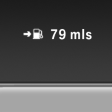 Repeatedly pressing the button
on the turn signal lever calls up
the following information on the
info display:
Repeatedly pressing the button
on the turn signal lever calls up
the following information on the
info display:
► Range.
► ECO PRO bonus range.
► Average fuel consumption.
► Current fuel consumption.
► Average speed.
► Date.
► Time of arrival.
When destination guidance is activated in the navigation system.
► Distance to destination.
When destination guidance is activated in the navigation system.
► Arrow view of navigation system.
When destination guidance is activated in the navigation system.
When the arrow view in the Head-up Display is inactive.
See also:
Disposal
Comply with the relevant environmental
protection regulations when disposing
of coolant and coolant additives. ...
Phone book
Displays
The phone book accesses the contacts and
shows all contacts for which a phone number
has been stored. The entries can be selected to
make a call.
1. "Telephone"
2. "Ph ...
The concept
The iDrive combines the functions of a multitude
of switches. Thus, these functions can be operated
from a central location. ...