
Calling up information on the infodisplay
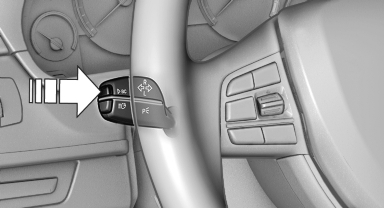
Press the onboard computer button on the turn signal lever.
Information is displayed on the info display of the instrument cluster.
See also:
Starting the engine
Never use spray fluids to start the engine.
1. Start the engine of the assisting vehicle and
let it run for several minutes at an increased
idle speed.
2. Start the engine of the vehicle being s ...
Sockets
The lighter socket can be used as a socket for
electrical equipment while the engine is running
or when the ignition is switched on. The total
load of all sockets must not exceed 140 watts at
...
Top View
The concept
Top View assists you in parking and maneuvering.
The area around the doors and the road area
around the vehicle are shown on the Control
Display for this purpose. ...